Security
The new and updated features for the 4.51 release are as follows:
| Header | Business impact | Affected topics |
|---|---|---|
|
OAuth authentication support for EBS4 web services |
Staff can now authenticate EBS4 web services using OAuth, removing the need to rely on legacy EBS authentication. Ontrack and Central already support external third‑party authentication providers, including Microsoft Entra ID and Google Workspace, as an alternative to EBS authentication. As previously announced, Tribal are not investing in further development of legacy authentication methods, including EBS authentication. This update extends OAuth support to EBS4 web services, providing a modern and consistent authentication approach. This change helps you improve security, reduce dependency on legacy user accounts, and align with current authentication standards. |
|
|
EBS REST API supports OAuth authentication |
In User Management, the Create/Edit User dialog has been updated to add service account to the list of available authentication types. A service account user must use external authentication. This user will not be able to log directly into EBS Ontrack or Central, but can be used to provide a secure way for third-party systems to authenticate with EBS web services using a bearer token (OAuth). There are 4 new Institution Settings to support OAuth2.0 authentication with EBS4 web services as follows:
|
|
|
OAuth workflow activity |
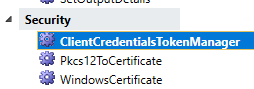
A new Security section has been added to the Activity Toolbox in EBS Central > Workflow Manager, containing three new activities as shown in the image below.
The new activities are as follows:
|
Tribal toolbox activities |
| Header | Business impact | Affected topics |
|---|---|---|
|
Removal of database assemblies |
The following database assemblies, and associated procedures and functions, have been removed from the EBS database, and their functionality replaced with native SQL Server functionality. Any custom code that references these assemblies will need to be updated and replaced.
As part of this change, and to increase security, the database TRUSTWORTHY setting has been set to OFF. This means that only trusted, signed assemblies can be used in the EBS database. For further information, please refer to the Microsoft documentation. |
Not applicable |
|
Database TRUSTWORTHY setting modified |
The TRUSTWORTHY database property is used to indicate whether the instance of SQL Server trusts the database and the contents within it. This has been set to OFF for the EBS database to match the recommended Microsoft most secure configuration. For more information, go to Microsoft documentation. If you have applied custom assemblies to the database, these may no longer function correctly. Please consult the Microsoft documentation for guidance on how to apply these successfully. It is not recommended that this setting be turned back ON. |
Not applicable |