To create groups against a course:
-
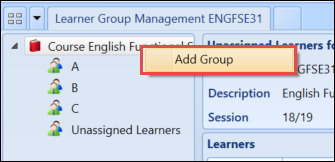
Select and hold (or right-click) on the Course tab and select Add Group .
-
Enter the name of the new group in the Group Name field.
 Important.The Active check box is enabled by default. This must be enabled in order to add learners to the group.
 -
Select the Save button to save the changes.
 Important.It is also possible to create course groups in Central on the Curriculum Details screen.