The room section of the navigation pane displays the list of pages available to navigate to and from the room. You can quickly navigate to a page showing any events associated with the room.
Details
The room Details page displays information about the room, including the capacity, size and facilities for the room. This also includes where the room is located in the Location section. This includes the description and address of the location for the room, as shown in the image below.

Events
The room Events page enables you to view the events linked with the room you are viewing, as shown in the image below.
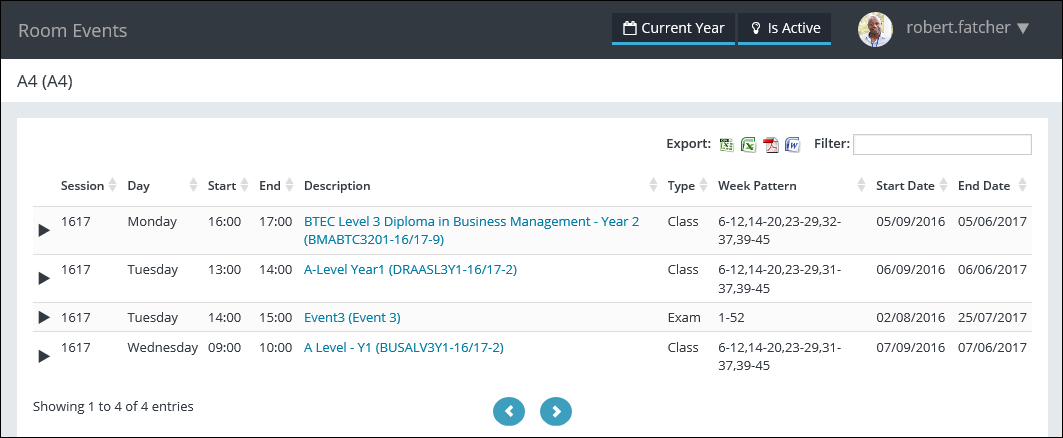
The fields on the Room Events page are described in the following table.
| This field | Holds this information... |
|---|---|
| Session | The session the course occurrence falls into for the register event. |
| Day | The day of the register event. |
| Start | The start time of the register event. |
| End | The end time of the register event. |
| Description | The description of the register event. You can select the description to view further details. |
| Type | The type of register event. |
| Week Pattern | The week pattern(s) for the register event. |
| Start Date | The start date of the register event. |
| End Date | The end date of the register event. |
| Courses |
The courses associated with the register event. Important.This field is only displayed when the expand arrow is selected for a register event record.
|
| Groups |
The course groups associated with the register event. Important.This field is only displayed when the expand arrow is selected for a register event record.
|
| Staff |
The staff member associated with the register event. Important.This field is only displayed when the expand arrow is selected for a register event record.
|