Ontrack Learner Hub allows you to submit enquiries to your institution. You can make two types of enquiries, general enquiries and course enquiries.
You can start an enquiry directly from the institution’s website or from within Ontrack Learner Hub after you sign in. If you begin an enquiry on the institution website, you’re redirected to the Ontrack Learner Hub login page. If you’re a new user, you can also register your details before submitting your enquiry.
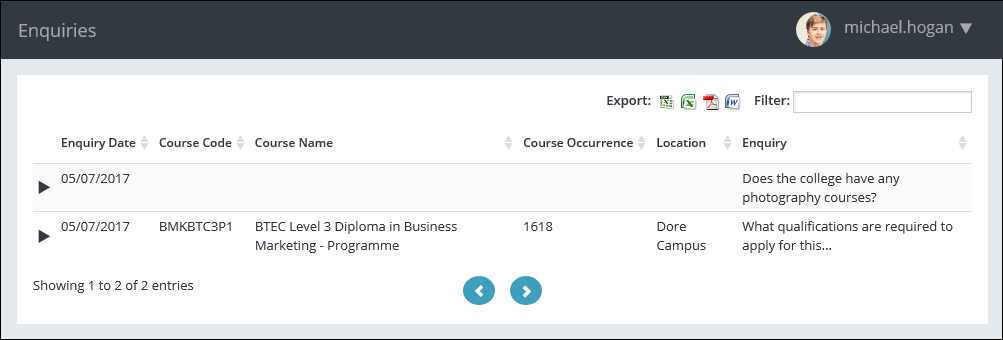
Once you’re signed in, you can create and submit an enquiry. After the enquiry is saved, it appears on your enquiries page, where you can see a list of all enquiries linked to your account. Each enquiry record shows its details and current status.
The image Enquiries, shows an example of a general enquiry about whether photography courses are offered, as well as a course enquiry about what qualifications are required for a business marketing course.
General Enquiries
You create a general enquiry when you want information that isn’t linked to a specific course. When you choose this option, Ontrack Learner Hub opens a form where you enter your enquiry details. After you submit the form, the system confirms the submission, sends you an email notification, and adds the enquiry to your enquiries page.
Course Enquiries
You use a course enquiry when your question relates to a specific course. When you select a course from the institution’s website, Ontrack Learner Hub opens a course enquiry form. You add your enquiry details and submit the form. As with general enquiries, the system confirms the submission, sends you an email notification, and adds the enquiry to your enquiries page.