The Interviews area helps you manage interviews linked to your applications. From here, you can see interviews you’ve already booked and interviews that are available for you to schedule.
You can:
-
View or cancel interviews that have already been scheduled.
-
Book interviews that your institution has offered.
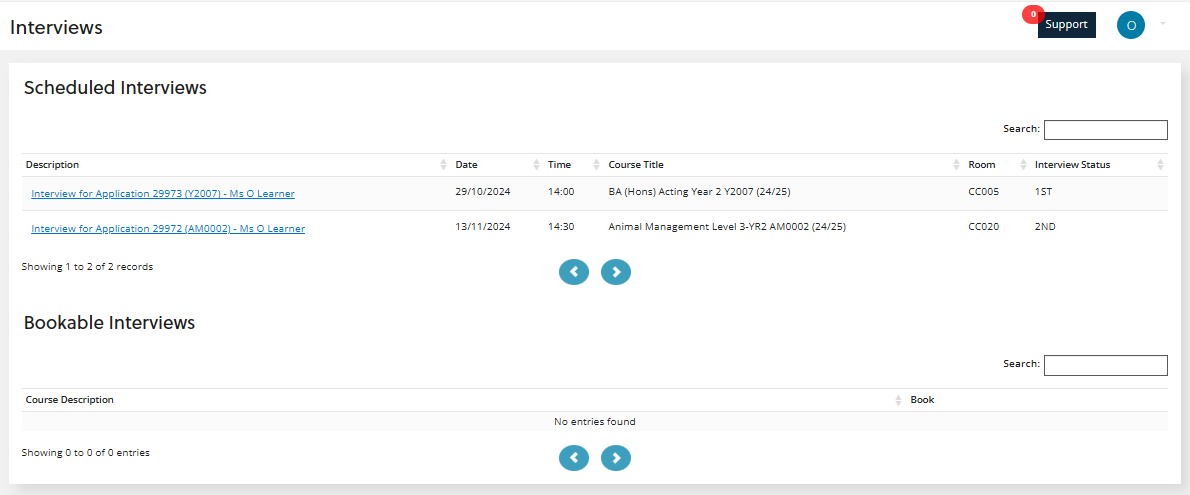
Scheduled interviews appear in the scheduled interviews section, and interviews you need to book appear in the bookable interviews section.
You can select an interview to view more information about it. The image Interviews shows an example of a learner with two scheduled interviews for courses, with no bookable interviews.
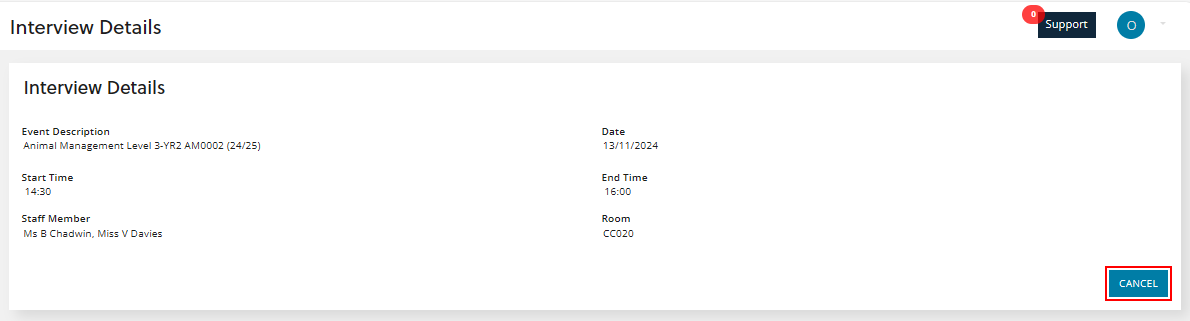
You can drill-down on an interview to view additional details, as shown in the image Interview details.
Cancel an interview
If you’re unable to attend a scheduled interview, you can cancel it. When you select the interview, the Interview details page shows more information to help you decide whether to cancel.
Book an interview
When you need to book an interview, you choose the course, select a suitable date and time, and confirm your choice. After you confirm your booking, the interview appears in the scheduled interviews section.