|
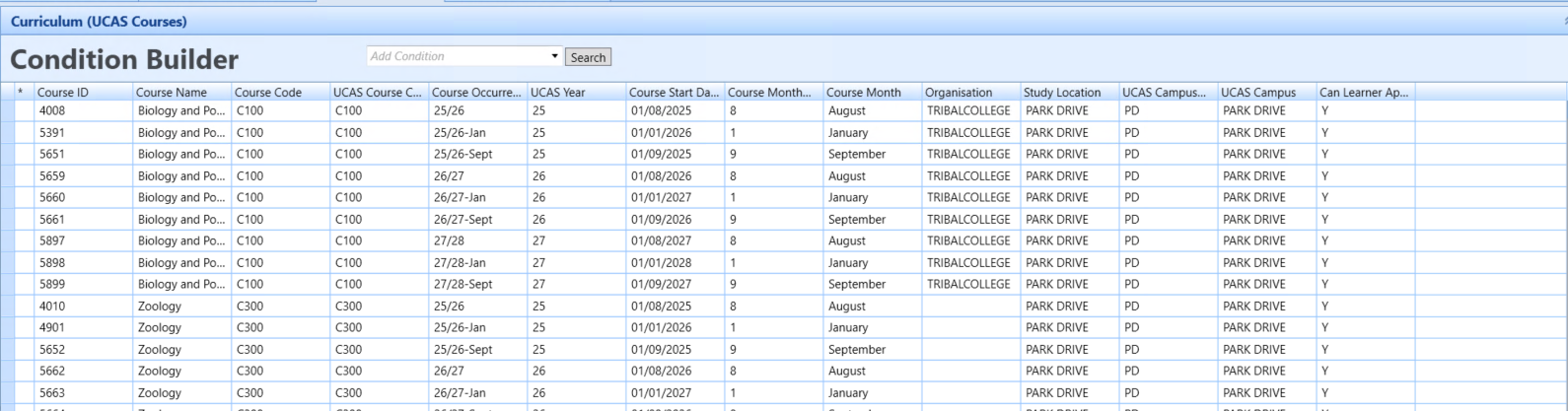
UK User can now view key EBS-to-UCAS course matching data via a new UCAS Courses view in Data Miner
|
Location
EBS Central > Reporting menu > Data Miner > Curriculum context > UCAS Courses view.
What's new
The new read-only UCAS Courses view shows the key data that EBS uses to match curriculum course occurrences to UCAS courses. You can use this information to investigate mismatches between EBS and UCAS.
Behaviour
-
Columns displayed: Course ID, Course Name, Course Code, UCAS Course Code, Course Occurrence, UCAS Year, Course Start Date, Course Month Number, Course Month, Organisation, Study Location, UCAS Campus Code, UCAS Campus, Can Learner Apply.
-
Campus resolves via Organisation or Study Location, depending on the institution's UCAS Campus Mapping setting. If no mapping is available, UCAS Campus Code shows "n/a" and UCAS Campus (description) is blank.

-
Organisation shows Owning Organisation, falling back to Offering Organisation if not set; blank if neither is set.
-
Course Name shows the course occurrence's description, falling back to the unit instance's description if not set; blank if neither is set.
-
A course occurrence is excluded from the view if it has no UCAS Course Code or no UCAS Year.
-
Whether two occurrences sharing the same UCAS Course Code and Year but different start months are treated as duplicates (and excluded) or shown as separate rows depends on the institution's Match on Month setting.

If an expected course is not listed but has a UCAS Course Code and UCAS Year, look for another occurrence with the same code and year. Depending on your institution settings, also check whether it has the same course month and UCAS campus. The occurrence might have been excluded as a duplicate.
|
UCAS data import
Check UCAS course-matching data
|