You can enable an Ontrack website for external authentication, it is necessary to update the website configuration file with the Client Secret for Microsoft Entra ID or Google Workspace.
It is recommended that the website configuration changes are made by re-running the installer and entering the appropriate details. It is possible to manually update the settings, but if making manual changes, then ensure that the settings are also correctly updated when the installer is next used to avoid the manual edits being reverted.
To configure an EBS application server:
-
Access the EBS Installer.
-
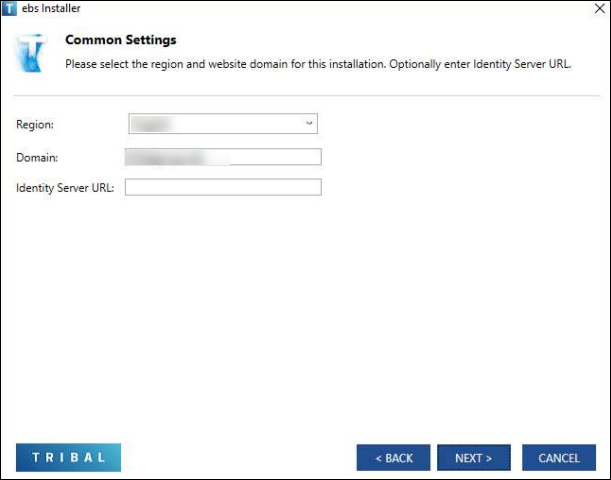
Navigate to the Common Settings screen and enter the Identity Server URL .
-
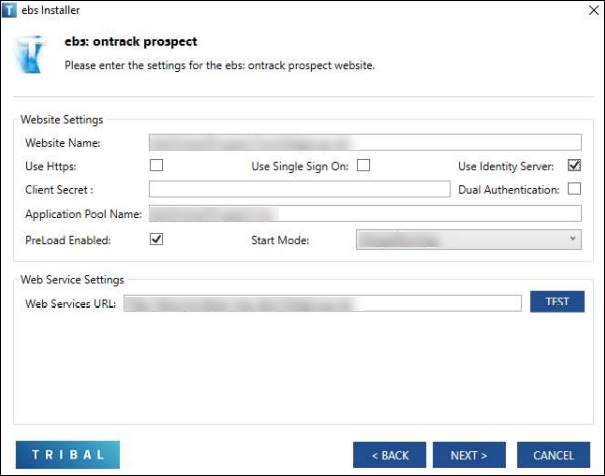
Navigate to the EBS Ontrack prospect screen. Enter the following:
-
Select the Use Identity Server check-box
-
Enter the Client Secret value for Microsoft Entra ID or Google Workspace
-
Select the Dual Authentication check-box if you wish to give users the choice of logging with either EBS credentials or using their Microsoft Entra ID credentials.
-