Check a learner's attendance as follows:
-
Open the Attendance screen.
-
Select the arrow to open the attendance search screen.
-
Use the drop-down menus to choose the time period you want to review and then select .
Understand the attendance summary
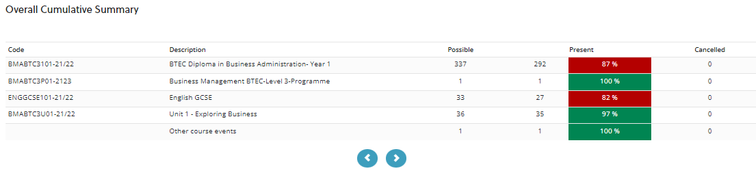
After you run the search, EBS displays a summary of the learner’s attendance for the selected time period. The image below shows an example of a learner's attendance for the selected time period.
Note the following:
-
The summary is grouped by the courses the learner was enrolled on during that time.
-
Each course shows a percentage attendance.
-
A traffic light indicator highlights attendance performance:
-
Green - attendance is above the target
-
Red - attendance is below the target
-