View the learner's timetable as follows:
- View the timetable
-
The timetable screen shows the learner’s current timetable. By default, the timetable displays the current week.
-
Change the time period
-
Use the available controls to change the time period shown:
-
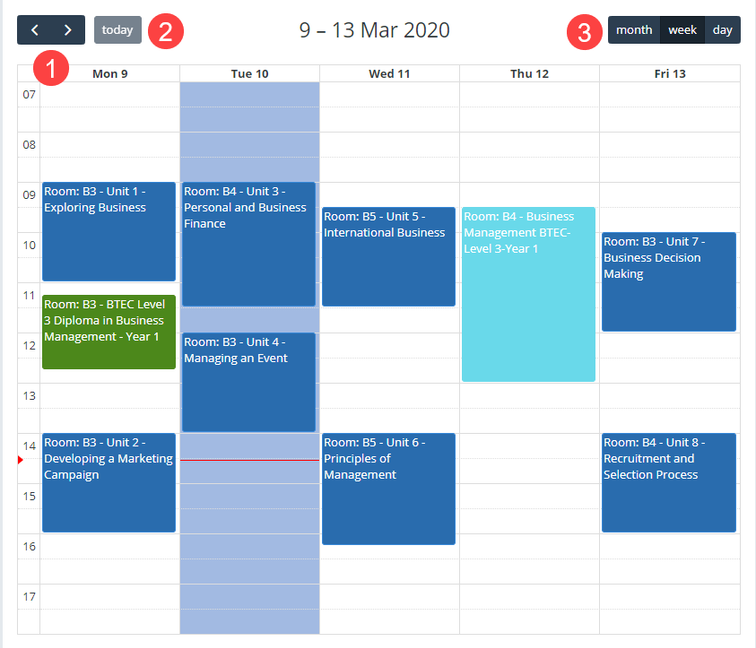
Scroll buttons - Use these to move forwards or backwards based on the selected time period. For example, week.
-
Today button - Select this to return to the current date, regardless of how far you have scrolled.
-
View buttons - Use these to choose the time period displayed. For example, day or week.
The image below shows an example of a learner's timetable with the navigation options described above.
-
-
-
View timetable details
-
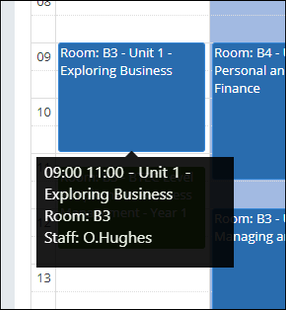
To see more information about a timetable item, move your cursor over the item. A tooltip displays additional details, as shown in the image below.
-